Add N1netails Client
Install
Install the slack client by adding the following dependency:
<dependency>
    <groupId>com.n1netails</groupId>
    <artifactId>n1netails-slack-client</artifactId>
    <version>0.3.0</version>
</dependency>
Gradle (Groovy)
implementation 'com.n1netails:n1netails-slack-client:0.3.0'
Usage
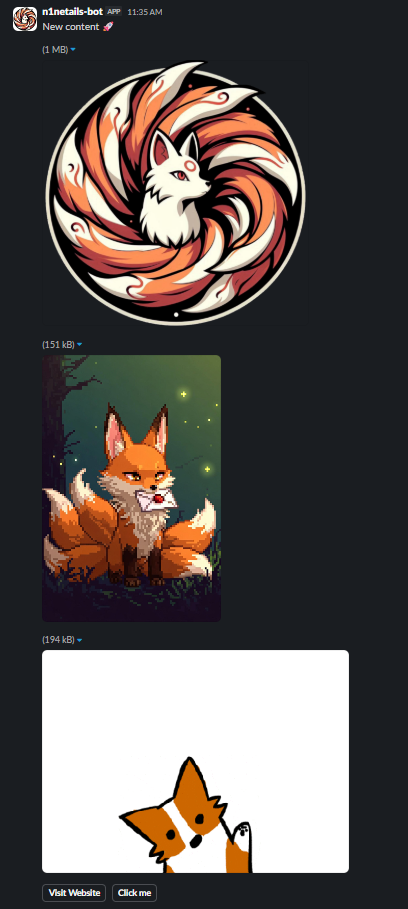
Here's how to use the client to send a message, pics or gifs:
import com.n1netails.n1netails.slack.api.SlackClient;
import com.n1netails.n1netails.slack.model.SlackMessage;
import com.n1netails.n1netails.slack.model.actions_element.ButtonElement;
import com.n1netails.n1netails.slack.model.block.TextBlock;
import com.n1netails.n1netails.slack.model.block.ImageBlock;
import com.n1netails.n1netails.slack.model.block.GifBlock;
import com.n1netails.n1netails.slack.model.block.ActionsBlock;
import com.n1netails.n1netails.slack.model.element.ButtonElement;
import com.n1netails.n1netails.slack.exception.SlackClientException;

public class Example {
    public static void main(String[] args) {
        // Your bot token
        String token = "xoxb-your-bot-token";

        // Channel to send the message to
        String channel = "#prototype";

        // Build the Slack client
        SlackClient slackClient = SlackClient.builder()
                .token(token)
                .build();

        // Build an ActionsBlock
        ActionsBlock actionsBlock = ActionsBlock.builder()
                .addElement(ButtonElement.link("Visit Website", "https://example.com"))
                .addElement(ButtonElement.builder().text("Click me").actionId("YOUR ACTION ID").build()) //Elements support 2 types of creation
                .build();

        // Build the Slack message
        SlackMessage message = SlackMessage.builder()
                .channel(channel)
                .text("New content 🚀") // fallback message for notifications
                .addBlock(TextBlock.builder().text("New content 🚀").build())
                .addBlock(ImageBlock.builder()
                        .imageUrl("https://n1netails.com/img/n1netails_icon_transparent.png")
                        .altText("N1netails token")
                        .build())
                .addBlock(ImageBlock.of("https://n1netails.com/img/quickstart/n1netails-letter.jpg", "N1netails letter")) //Blocks support 2 types of creation
                .addBlock(GifBlock.builder()
                        .gifUrl("https://media1.giphy.com/media/v1.Y2lkPTc5MGI3NjExaDRhOWtpMnVsM2NiMzJ4aXpoOXpuamZzcHpudG4zbzIzenVlaHN0eSZlcD12MV9pbnRlcm5hbF9naWZfYnlfaWQmY3Q9Zw/xsE65jaPsUKUo/giphy.gif")
                        .altText("Fox GIF")
                        .build())
                .addBlock(actionsBlock) // add the actions block with buttons
                .build();

        try {
            // Send the message
            slackClient.sendMessage(message);
            System.out.println("Message sent successfully!");
        } catch (SlackClientException e) {
            System.err.println("Error sending message: " + e.getMessage());
        }
    }
}
Advanced Usage (Using Block Kit)
You can also send more complex messages using Slack's Block Kit.
import com.n1netails.n1netails.slack.api.SlackClient;
import com.n1netails.n1netails.slack.model.SlackMessage;
import com.slack.api.model.block.Blocks;
import com.slack.api.model.block.composition.BlockCompositions;
import com.n1netails.n1netails.slack.exception.SlackClientException;

import java.util.List;

public class AdvancedExample {
    public static void main(String[] args) {
        String token = "xoxb-your-bot-token";
        String channel = "#prototype";

        // Build the Slack client
        SlackClient slackClient = SlackClient.builder()
                .token(token)
                .build();

        // Build a Slack message with custom Block Kit blocks
        SlackMessage message = SlackMessage.builder()
                .channel(channel)
                .text("This is a fallback message for notifications.") // fallback
                .addRawBlock(
                        Blocks.section(section ->
                                section.text(BlockCompositions.markdownText("*This is a message with custom blocks.*"))
                        )
                )
                .build();

        try {
            slackClient.sendMessage(message);
            System.out.println("Advanced message sent successfully!");
        } catch (SlackClientException e) {
            System.err.println("Error sending message: " + e.getMessage());
        }
    }
}
Example message output

Example media output